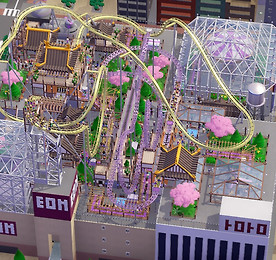
Gaming 썸네일형 리스트형 파키텍트 캠페인 - 테크노폴리스 여기서 소개할 파키텍트 캠페인은 기술도시 (Technopolis)라는 맵입니다. 모험의 맛 DLC에 포함된 시나리오로서, 도쿄에 위치한 쇼핑몰 옥상에 작은 놀이공원을 지어서 만능 엔터테인먼트 단지로 개발한다는 설정을 가지고 있죠. 롯데월드 스카이프라자와 비슷한 컨셉으로 테마파크를 만들면 되는 것 같습니다. 필수 목표는 손님을 450명 유치하고, 청결 수치를 90% 넘게 달성하는 것인데요. 일정기간동안 유지하는 게 아니라 목표치를 달성하는 순간 완료되는 형식입니다. 선택 목표로는 흥미도가 65 이상인 롤러코스터 2대 이상을 건설하고, 트랙형 놀이기구의 청사진을 쓰지 않으며, 일시정지 상태에서 건설을 하지 않는 것이 있습니다. 모든 필수 목표를 2년 12월까지 달성하는 것 역시 선택 목표로 걸려 있습니다. .. 더보기 파키텍트 캠페인 - 드래곤 밸리 여기서 소개할 파키텍트 캠페인은 용의 계곡 (Dragon Valley)이라는 맵입니다. 모험의 맛 DLC에 포함된 시나리오로서, 장가계를 모티브로 한 듯한 중국 테마의 놀이공원이죠. 기암괴석들을 구현해놓은 덕분에, 지면 높이의 편차가 매우 크고 지형편집이 불가능하다는 조건이 걸려 있습니다. 목표는 800명 이상의 손님을 유치하고 체험수치 80%를 3년 1월까지 달성해야 합니다. 일시정지 상태에서 건설이 가능하기 때문에, 롤러코스터 트랙을 구상하는데 있어서 부담이 없습니다. 반면에 트랙형 놀이기구의 높이 제한 때문에, 절벽 위에 짓는게 불가능한 경우도 있는게 난점입니다. 선택 목표중에 흥미도가 80.0 이상인 롤러코스터를 짓는게 있는데요. 시작부터 주어지는 스틸 롤러코스터를 가지고 지하 터널을 적당히 포함.. 더보기 파키텍트 캠페인 - 군도 탐험 오랫만에 게임 관련 포스팅이네요. 파키텍트 캠페인 중에 마음에 드는 맵들을 몇 개 골라서 2회차 플레이를 해보고 있습니다. 이번에는 목표 달성뿐만 아니라 꾸미기에도 중점을 두고 공원을 만들고 있는데요. 여기서 소개할 것은 군도 탐험 (Archipelago Adventures)이라는 맵으로서, 열대지방의 다도해를 컨셉으로 한 캠페인입니다. 폴리네시안 테마가 가장 잘 어울리는 맵인 것 같은데, 제가 몰디브나 세이셸 같은 곳을 실제로 가 본 적이 없어서 상상력에 의존해서 공원을 디자인해야 한다는 난점이 있었습니다. 그래도 DLC에 포함된 나무와 식물들을 추가해서 열대 섬 테마로 꾸며주니까 만족할 만한 결과가 나왔습니다. 공원 전경의 낮과 밤 사진입니다. 대출금이 없는 상태로 체험수치 70%와 운영 수익 $15.. 더보기 에이지 오브 엠파이어 2 결정판 캠페인 : 아시아 / 가자 마다 이번에 플레이해 본 캠페인은 가자 마다 (Gajah Mada) 입니다. 가자 마다는 현재 인도네시아 지역에 존재했던 마자파힛 제국의 재상으로서, 영토 확장 뿐 아니라 국가 운영에 전반적으로 큰 기여를 했다고 하는군요. 인도네시아에는 그의 이름을 딴 대학교도 있을 정도로 명성이 자자합니다. 가자 마다 - 위키백과, 우리 모두의 백과사전 ko.wikipedia.org 에이지 오브 엠파이어 2 (라자의 부흥) 캠페인에서도 등장하며, 마자파힛 제국의 군대가 가자 마다의 지휘아래 반란을 진압하고 영토를 확장하는 등의 이야기를 다루고 있습니다. 지역에 걸맞게 말레이 문명으로 플레이하게 되고, 해상전의 비중이 높은 것도 특징입니다. 총 5개의 미션으로 이루어져 있으며 여러번의 세이브, 로드 끝에 결국 어려움 난이도로.. 더보기 커맨드 앤 컨커 3 타이베리움 워 - GDI,Nod 캠페인 예전부터 생각만 하고 컴퓨터가 구려서 못했던 커맨드 앤 컨커 3 타이베리움 워를 드디어 플레이 해 보았습니다. 나온지 10년도 넘은 게임이라 멀티플레이를 할 건 아니고, 스토리나 감상해보자는 생각으로 일단 캠페인을 플레이했습니다. 처음에는 GDI 와 Nod 캠페인을 따로 포스팅할까 생각했습니다만, 평행우주가 아닌 하나의 스토리를 가지고 GDI와 Nod의 입장에서 전투를 치르는 방식이라 한번에 묶어서 포스팅 하는 방식이 낫겠다 싶습니다. 줄거리 설명은 타이베리움 워 에피소드에 대한 나무위키 페이지를 참고했습니다. 게임의 재미를 더하기 위해 어려운 난이도로 플레이 했습니다. 쉬움이나 보통으로 플레이하면 AI한테 발려도 게임이 어려워서 그랬다고 정신승리를 못하거든요. 저에게 시련을 안겨준 미션이 몇개 있었는데.. 더보기 Doomsday Engine (버전 2.3.1) 클래식 둠 및 헤러틱, 헥센을 플레이하기 위한 프로그램인 둠스데이 엔진의 업데이트된 버전 2.3.1에 대해 간략히 소개해볼까 합니다. 이 소스포트는 본래 헥센을 플레이하기 위한 jHEXEN으로 시작되었는데요. 이후 둠과 헤러틱을 위한 jDOOM 및 jHERETIC이 개발되었고, 이들이 통합되면서 지금의 둠스데이 엔진이라는 소스포트가 되었습니다. Doomsday Engine A rejuvenation. id Software's Doom pioneered the modern first-person shooter genre. Released in 1993, it was a quantum leap in game engine technology with fluid and — at the time — incredi.. 더보기 롤러코스터 타이쿤 3 - 자작 트랙 열전 오랫만에 롤러코스터 타이쿤 3 에서 롤러코스터 트랙을 몇개 만들어 보았습니다. 심심풀이로 만들기는 했지만, 그렇다고 대충 막 만든 건 아니구요. 비용 대비 흥미도를 고려하면서, 시나리오 클리어에 도움이 될 만한 트랙을 만드는 데 중점을 두었습니다. 게임에서 기본적으로 주어지는 트랙들이 있습니다만, 가성비가 별로인 경우도 좀 있어서 직접 만든 트랙들을 소개 및 공유해 봅니다. 스샷에 나온 흥미도 및 격렬도 스탯들은 평지 위에 붙여 지었을 경우를 가정한 것이라서, 시나리오 맵에서 실전배치했을 때는 좀 달라질 수 있어요. RCT3 플래티넘에서 제작했습니다만 컴플리트 에디션에서도 호환될 것으로 생각되고, 트랙 이름은 그냥 적당히 되는대로 지었습니다. 게임이 설치되어 있으면 내 문서\RCT3\Coasters 디렉.. 더보기 헥센 확장팩 - 암흑 요새의 사왕들 고전 FPS 인 헥센에는 공식 확장팩이 하나 있습니다. 정식 타이틀은 영어로 Deathkings of the Dark Citadel 인데요. 이번 포스팅의 제목에는 적당히 한글로 번역해서 써놓았습니다. 존재 자체가 한국에는 잘 알려지지 않아서인지, 이 번역이 맞는지 아닌지는 솔직히 잘 모르겠어요. 예전에 제가 스팀에서 구입했던 헤러틱+헥센 컬렉션 번들에 (헤러틱, 핵센, 헥센2 와 더불어) 포함되어 있길래 한번 해보았습니다. 출처 : heretic.fandom.com/wiki/Hexen:DotDC 확장팩의 스토리는 본편에서 크로노스의 영웅인 전사 배러투스, 성직자 패리어스, 마법사 데이덜런이 서펜트 라이더 중 하나인 코락스를 무찌른 뒤, 혼돈의 구체 (Chaos Sphere)에 도달하면서 시작됩니다. 더.. 더보기 헥센 - 크로노스의 분노 (HEXEN - Wrath of Cronos) RPG 이번에는 크로노스의 분노라는 개꿀잼 모드에 대한 포스팅. 출처 : doom.fandom.com/wiki/Hexen 원래 헥센은 헤러틱, 헥센2와 함께 인간세계를 침공한 세 명의 서펜트 라이더들을 무찌르는 내용의 판타지 FPS 인데요. 크로노스 (Cronos)는 서펜트 라이더들이 침략한 세계 중 하나로서, 헥센의 무대이기도 합니다. 크로노스의 분노 (Wrath of Cronos)는 레벨과 스킬 등의 RPG 요소들이 추가되고, 더 다양한 적들이 등장하는 모드입니다. 모드를 플레이하기 위한 셋업방법은 브루탈 헤러틱에 대한 포스팅에서 언급한 것과 크게 다르지 않습니다. 먼저 ZDoom 포럼에 나오는 다운로드 링크로부터 모드 파일을 구해야 합니다. 헥센을 플레이하는 경우라면 맨 위에 있는 메인 파일 (main f.. 더보기 브루탈 헤러틱 (Brutal Heretic) RPG 최근에 플레이한 브루탈 헤러틱 RPG라는 모드에 대한 포스팅. 본래 헤러틱이라는 게임은 간단히 말해서 클래식 둠 시리즈와 비슷한 판타지 FPS인데요. 서펜트 라이더들을 숭배하기를 거부했다는 이유로 대부분이 학살당한 시(Sidhe)라는 엘프족의 한 젊은이가 복수를 하면서 서펜트 라이더 중 한명인 드'스파릴 (d'sparil)과 그 수하들을 없앤다는 스토리를 가지고 있습니다. 서펜트 라이더는 3명이 있는데, 헤러틱, 헥센, 헥센2에서 이들을 각각 무찌르게 됩니다. 게임에 대한 세부사항은 나무위키 페이지를 참고하면 좋습니다. 브루탈 헤러틱 RPG는 속도감과 타격감을 향상시킨 모드로 레벨업이라는 RPG적인 요소가 도입된 것이 특징입니다. 브루탈 헤러틱 RPG를 플레이하기 위해서는 원본 게임의 heretic.wa.. 더보기 이전 1 2 3 4 다음